---
title: How to choose the right layout for your video [+ free planning tool]
description: "How to structure video layout in VideoScribe with different styles to suit your audience and topic: mind map, collage and linear vertical or horizontal."
image: https://blog.videoscribe.co/hubfs/How%20to%20choose%20the%20right%20layout%20for%20your%20video%20free%20planning%20tool.png
---
[](https://www.videoscribe.co/)
- [Home](https://www.videoscribe.co/en/)
- [Using VideoScribe](https://www.videoscribe.co/en/using-videoscribe/)
- [Pricing](https://www.videoscribe.co/en/pricing/)
- [Blog](https://blog.videoscribe.co/)
- [About](https://www.videoscribe.co/en/about/)
- [Help](https://support.sparkol.com/knowledge)
- [Login](https://www.videoscribe.co/en/login/)
- [Try for free](https://www.videoscribe.co/en/free-trial/)
- [Home](https://www.videoscribe.co/en/)
- [Using VideoScribe](https://www.videoscribe.co/en/using-videoscribe/)
- [Pricing](https://www.videoscribe.co/en/pricing/)
- [Blog](https://blog.videoscribe.co/)
- [About](https://www.videoscribe.co/en/about/)
- [Help](https://support.sparkol.com/knowledge)
- [Login](https://www.videoscribe.co/en/login/)
- [Try for free](https://www.videoscribe.co/en/free-trial/)
1. [Home](https://www.videoscribe.co/)›
2. [Blog](https://blog.videoscribe.co)›
3. [How-to Guides](https://blog.videoscribe.co/tag/how-to-guides)›
4. How to choose the right layout for your video \[+ free planning tool\]
# How to choose the right layout for your video \[+ free planning tool\]
Posted by [Naomi Linford](https://blog.videoscribe.co/author/naomi-linford) on July 26, 2021

The beauty of VideoScribe is that we provide you with the perfect blank canvas to fill and shape with your ideas.
But when the video possibilities are endless, where do you start?
The answer is, with a layout. Composing your video in a layout that makes sense for your topic and your audience helps you stay on track and improves your audience’s experience.
With [VideoScribe](https://www.videoscribe.co/app), the roaming canvas feature means that you are free to layout your video in whatever way best suits you and your content. We will look at some of the most effective different layout structures you could try in this blog.
When it comes to choosing the right layout for your video using the roaming canvas, there are four main options to pick from as you can see below. We’ll discuss each of them in this blog along with top use cases and our tips for a successful video.
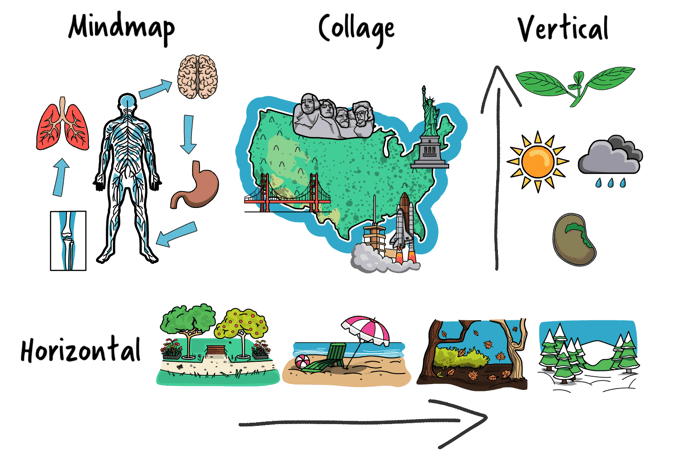
Plus, if you're still not sure which layout is right for your video or want a quick helping hand, you can use our free quiz to find out 👇
[Take the layout quiz!](https://form.typeform.com/to/QTlFS0Kv?typeform-medium=embed-snippet)
## Considerations for choosing your video layout
Before we get into the layouts, it's important to have an idea of what you want your video to convey. So start by thinking about these factors:
- **Have you planned your video from start to finish**? If you haven’t then do this now, you can only really decide on a layout once you know how many scenes you’ll have. For our advice and tips on effective video planning, [check out our guide here.](https://blog.videoscribe.co/8-steps-to-plan-a-killer-explainer-video/)
- **How long will your video be?** Shorter videos that only have a couple of scenes don’t need such a defined structure. Use the techniques in this blog for longer videos of 3 scenes or more.
- Finally, all of these layouts require you to **know how to set the camera and create a scene in VideoScribe**. If you don’t already know how to do this, [click here to find out how](https://support.sparkol.com/knowledge/tutorial-2-setting-the-camera-and-create-a-second-scene).
## Mind Map Video Layout
As the name suggests this first option is about presenting your content in a mind map or spider diagram structure. By this we mean you'll have one central idea, theme or message and then your other point build on it.
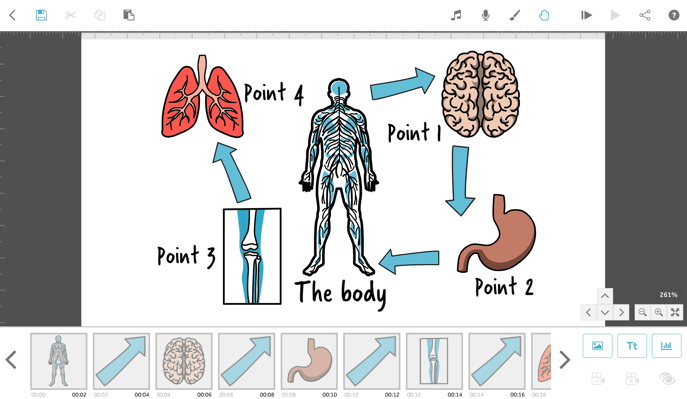
This layout is brilliant for:
- Explaining the breadth of a topic and showing scale - if you want to dive deeper into a topic without overwhelming your audience with text then a mind map is a great choice.
- Supporting learning and revision by highlighting only the key points from a text, topic or lesson.
- Summarizing information - i.e. a book summary. The book could be in the middle and themes discussed around the outside.
- FAQs - if your organization receives a lot of the same questions, a quick video about common areas such as pricing, delivery or returns could help clear up confusion.
So how does your mind map video play? We recommend setting your camera so that you start in the middle with your key point and then the camera follows each new point that sparks off the centre. This way you're guiding your audience through the information. You could then zoom out at the end to see all the content in one frame. This is super effective for solidifying knowledge and as a single snapshot of the content covered.
If you want to get started experimenting with a mind map layout, our video template can help. As you can see we've themed this around home working self care but all elements are fully customizable so this template could be about whatever you like! Just log into VideoScribe or [start your free 7-day trial to use this template](https://www.videoscribe.co/en/sign-up) and more 🙌
## Collage Video Layout
This next layout is similar to a mind map but with some key distinctions. Firstly, instead of having your content spread out around one key point, in a collage your images and text look better if they're much closer together or even overlapping. This is not only really visually pleasing but it helps us make connections with the information.
Secondly, in a collage, your content doesn't all have to revolve around one point and doesn't have to follow one path. It can, but equally you can use collages to tell stories or explain something in a non-linear way. So you have more freedom to get creative!
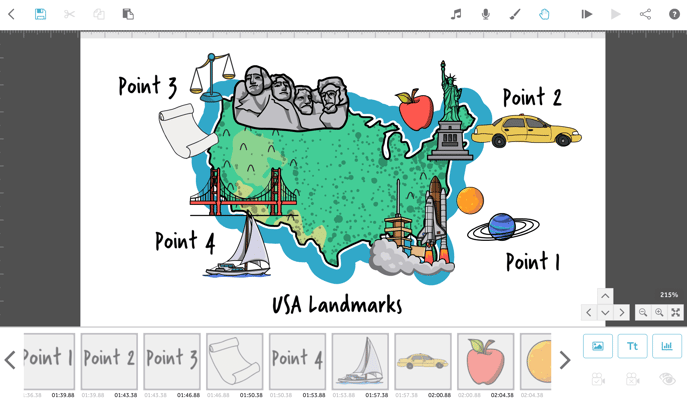
Video collages are awesome for:
- Explaining a topic - you're really just sharing some key bits of information in a more visual style.
- Telling stories - you can jump from one part of your story to the next with ease and still zoom out at the end to show the whole journey.
- Getting creative! If you want to give a flavor of a new idea, brand or concept, creating a video collage of potential colors, fonts and photos can be really effective.
Our explainer collage template is the perfect example of this layout in action 👇 Just log into VideoScribe or [start your free 7-day trial to use it](https://www.videoscribe.co/en/sign-up) 🎉
## Linear Vertical Layout
Now that we've talked about the less linear layout options, let's look at two more structured options. We're going to be talking about vertical and horizontal scenes. Starting with the vertical version - this is essentially a layout where the content follows a sequential in your video and moves in a downwards or upwards line.
As you can see this layout does not use the canvas in such an efficient way. With that in mind, this style of video is more suited to those that end on the last scene, rather than zooming out to see the whole video.
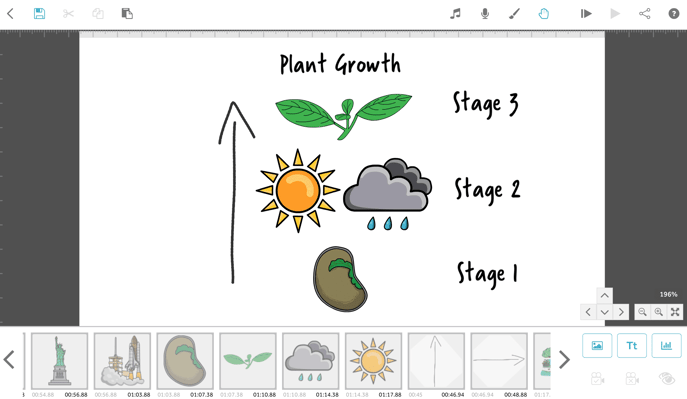
Vertical linear structures are great for:
- Telling stories or presenting information with an underlying message of rising up or sinking down - i.e. if your video is about steps to success, progressing your career or teaching students about the atmosphere then a video that moves upwards will reinforce your message.
- Diving into the detail - if you want to show that you're moving into a subject like the features of a product, teaching students about different types of rock or using an under the sea theme, a downward moving video is perfect.
- Clear and simple scenes - with each scene taking up it's own distinct space, there's no confusing what you're talking about and it can be easier to work in this way too.
If you want to get started with a vertical layout, our 'Your Story' template is perfect for you. Just log into VideoScribe or [start your free 7-day trial to get started](https://www.videoscribe.co/en/sign-up) 👇
## Linear Horizontal Layout
Lastly, this layout is the same idea as before but with a horizontal movement rather than vertical. This is arguably the simplest and easiest way to present information to ensure it's understood by everyone.
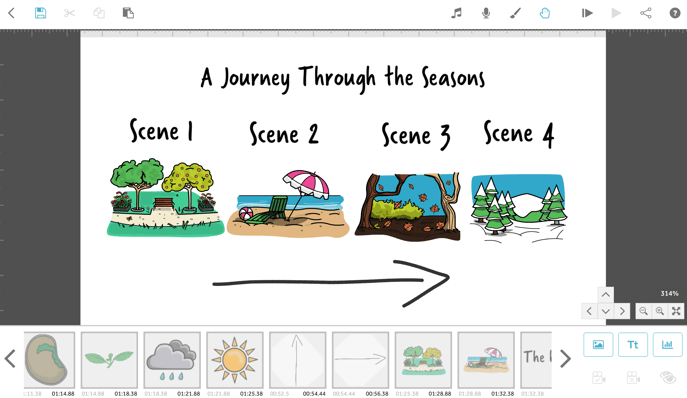
Horizontal layouts are the best choice for:
- Explainer videos - the simple structure ensures your information is crystal clear.
- Marketing or promotional videos - most persuasive videos follow a storytelling structure like this so you can move through from showing you understand the customer to explaining how you solve their problem.
- Storytelling - where you have defined scenes in your story a horizontal structure can help your video feel like it's moving forward through time as your story progresses. Similarly if you want to go back in time, move right to left. Think of each new scene as a new hour, day, month or year.
Our journey video template is a great example of this. Remember, it's just a case of logging into your VideoScribe account or starting a [free 7-day trial to customize this template](https://www.videoscribe.co/en/sign-up) and lots more 👇
Ready to create your own videos in these layouts? Log into VideoScribe to get started, or [start a FREE seven-day trial here](https://www.videoscribe.co/en/Free-Trial), no credit card required 👇
[](https://cta-redirect.hubspot.com/cta/redirect/5474140/fedeff97-352f-4443-a1ed-2d842315ae4a)
Topics: [How-to Guides](https://blog.videoscribe.co/tag/how-to-guides)
[.png "VideoScribe")](https://www.videoscribe.co/en/free-trial)
## Start your 7 day free trial today
Instant access, no upfront payments, no risk
[](https://cta-redirect.hubspot.com/cta/redirect/5474140/fedeff97-352f-4443-a1ed-2d842315ae4a)
### Subscribe to our blog
### POPULAR POSTS
- 
[8 Powerful storytelling techniques for unforgettable presentations](https://blog.videoscribe.co/8-classic-storytelling-techniques-for-engaging-presentations)
- 
[The 12 brand archetypes, and how to bring yours to life in video](https://blog.videoscribe.co/12-brand-archetypes-all-successful-businesses-are-built-on)
- 
[These 8 Christmas Movie Speeches Will Yank At Your Heartstrings](https://blog.videoscribe.co/these-8-christmas-movie-speeches-will-yank-at-your-heartstrings)
- 
[65% of People Prefer Visual Learning, Is Teaching Keeping Up?](https://blog.videoscribe.co/65-of-people-prefer-visual-learning-is-teaching-keeping-up)
- 
[Why the First 10 Seconds of Your Video Matter (And How to Nail Them)](https://blog.videoscribe.co/first-10-seconds-video-engagement-tips)
### YOU MIGHT ALSO LIKE
[How to build VideoScribe projects that are easy to update and maintain](https://blog.videoscribe.co/how-to-build-videoscribe-projects-that-are-easy-to-update-and-maintain)
June 17, 2026

[Blackboard animation videos? VideoScribe can do that too!](https://blog.videoscribe.co/blackboard-animation-videoscribe-can-do-that-too)
May 28, 2026

[Video Themes: How to Choose and Set One in VideoScribe](https://blog.videoscribe.co/how-to-choose-and-set-a-theme-for-your-videoscribe-video)
May 25, 2026
### COMMENTS
[](https://www.sparkol.com/en/)
### Company
[About us](https://www.videoscribe.co/en/about/)
[Using VideoScribe](https://www.videoscribe.co/en/using-videoscribe/)
[Help and Support](https://help.videoscribe.co/knowledge)
[Pricing](https://www.videoscribe.co/en/pricing/)
[VideoScribe Legacy](https://www.videoscribe.co/videoscribe-legacy)
[Security](https://www.videoscribe.co/en/security/)
[VideoScribe by Sparkol](https://www.videoscribe.co/en/who-is-sparkol/)
### Partners
[Affiliates](https://ui.main.com/merchant-profile-terms/18788)
[Resellers](https://www.videoscribe.co/en/resellers/)
### Legals
[Terms of use](http://www.sparkol.com/legal?__hstc=174690109.1bad370ff82786bc535d3bdf9bc915a2.1733304386981.1767788977555.1767789106068.1165&__hssc=174690109.3.1767789106068&__hsfp=425688717)
[Privacy policy](https://www.sparkol.com/privacy?__hstc=174690109.1bad370ff82786bc535d3bdf9bc915a2.1733304386981.1767788977555.1767789106068.1165&__hssc=174690109.3.1767789106068&__hsfp=425688717)
[Cookies](https://www.sparkol.com/cookies)
### Inspiration
[Templates](https://www.videoscribe.co/en/templates/)
[Our blog](https://blog.videoscribe.co/)
[Academy](https://www.videoscribe.co/en/our-academy/)
### Get in Touch
Sparkol Limited - UK
T: +44 (0)117 428 6117
Sparkol Limited - USA
T: 646-475-1630
```json
{
"@context" : "https://schema.org",
"@type" : "BlogPosting",
"author" : {
"@type" : "Person",
"name" : "Naomi Linford",
"url" : "https://blog.videoscribe.co/author/naomi-linford"
},
"dateModified" : "2021-11-23T16:17:38.098Z",
"datePublished" : "2021-07-26T10:50:00.000Z",
"headline" : "How to choose the right layout for your video [+ free planning tool]",
"image" : [ "https://blog.videoscribe.co/hubfs/How%20to%20choose%20the%20right%20layout%20for%20your%20video%20free%20planning%20tool.png" ],
"mainEntityOfPage" : {
"@id" : "https://blog.videoscribe.co/how-to-choose-the-right-video-layout-for-you",
"@type" : "WebPage"
},
"publisher" : {
"@type" : "Organization",
"logo" : {
"@type" : "ImageObject",
"url" : "https://blog.videoscribe.co/hubfs/VideoScribe-Logo%20(1)-min.png"
},
"name" : "Sparkol"
}
}
```
```json
{
"@context" : "http://schema.org",
"@type" : "Article",
"author" : {
"@type" : "Person",
"name" : "Naomi Linford"
},
"dateModified" : "October 1, 2026, 10:01:24 AM",
"datePublished" : "2021-07-26 10:50:00",
"description" : "How to structure video layout in VideoScribe with different styles to suit your audience and topic: mind map, collage and linear vertical or horizontal.",
"headline" : "How to choose the right layout for your video [+ free planning tool]",
"image" : {
"@type" : "ImageObject",
"url" : "https://f.hubspotusercontent40.net/hubfs/5474140/How%20to%20choose%20the%20right%20layout%20for%20your%20video%20free%20planning%20tool.png"
},
"mainEntityOfPage" : {
"@id" : "https://blog.videoscribe.co/how-to-choose-the-right-video-layout-for-you",
"@type" : "WebPage"
},
"publisher" : {
"@type" : "Organization",
"logo" : {
"@type" : "ImageObject",
"url" : "https://5474140.fs1.hubspotusercontent-na1.net/hubfs/5474140/VideoScribe-Logo%20(1)-min.png"
},
"name" : "This email is sent to you by Sparkol Ltd on behalf of The Sparkol Group: home to VideoScribe, Sparkol Studio & Sparkol Academy https://www.sparkol.com/legal. Sparkol Ltd. is registered in England and Wales with registration number 06762963"
}
}
```
```json
{
"@context" : "https://schema.org",
"@type" : "BreadcrumbList",
"itemListElement" : [ {
"@type" : "ListItem",
"item" : "https://www.videoscribe.co/",
"name" : "Home",
"position" : 1
}, {
"@type" : "ListItem",
"item" : "https://blog.videoscribe.co",
"name" : "Blog",
"position" : 2
}, {
"@type" : "ListItem",
"item" : "https://blog.videoscribe.co/tag/how-to-guides",
"name" : "How-to Guides",
"position" : 3
}, {
"@type" : "ListItem",
"name" : "How to choose the right layout for your video [+ free planning tool]",
"position" : 4
} ]
}
```